Home
» Computers
»
Windows Server 2022 Mainstream Support Ends October 13: What Changes for Updates?
Windows Server 2022 Mainstream Support Ends October 13: What Changes for Updates?
Windows Server 2022 does not stop working when mainstream support ends on October 13, 2026. The immediate change is in Microsoft’s support commitment: that October security release is the last update in the mainstream phase, while the server moves into extended support. Security updates continue after the transition, but administrators should no longer expect the same path for feature requests, routine non-security fixes, or included support benefits.
The distinction matters when planning patching and upgrades. A server can remain on Windows Server 2022 and keep receiving security updates for years, but “updates continue” does not mean every kind of update or assistance remains unchanged. Microsoft lists October 14, 2031 as the end of extended support. The practical next step is to confirm the installed edition and support date, keep security updates flowing, and decide whether a planned move to Windows Server 2025 fits the organization’s testing and application requirements.
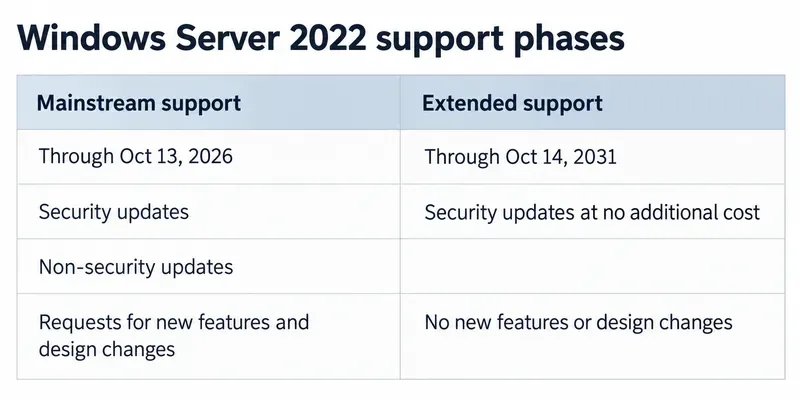
A lifecycle comparison shows the support-phase change: security updates continue in extended support, while mainstream-phase update requests and feature changes do not.
What changes on October 13?
Windows Server follows Microsoft’s Fixed Lifecycle Policy. During mainstream support, Microsoft includes security update support and the ability to request non-security updates, along with support benefits defined for the product and licensing program. In extended support, Microsoft continues security updates at no additional cost and offers paid support. Microsoft says it will not accept requests for warranty support, design changes, or new features in this phase.
For Windows Server 2022, Microsoft’s current Windows Server release-health page says the October 2026 security update will be the last mainstream-support update. After that, the product transitions to extended support and will continue to receive monthly security updates through October 14, 2031. That is the central update-related change: the security patch stream continues, but the mainstream support package of rights and expectations narrows.
Microsoft’s product lifecycle page identifies the editions covered by the Windows Server 2022 lifecycle: Datacenter, Datacenter: Azure Edition, Essentials, and Standard. It also displays support dates in Pacific Time and gives the end instant as October 14, 2026, at 6:59:59 a.m. PT. Microsoft’s release-health summary labels the transition date October 13. These are two presentations of the boundary in different formats; for planning, use October 13 as the final mainstream date and October 14, 2031 as the published end of extended support.
Common assumptions: what is true, and what to do
Assumption
What Microsoft’s policy says
Useful action
“All updates stop on October 13.”
No. Monthly security updates continue during extended support through October 14, 2031.
Keep the normal security-update process active and verify that each server is receiving the latest applicable security cumulative update.
“Extended support keeps every type of fix and feature request.”
No. New feature and design-change requests are not accepted. Non-security updates are not a guaranteed, general-purpose stream; Microsoft can still create and broadly distribute certain non-security updates in specific cases.
For a non-security issue, check Microsoft’s lifecycle policy and the relevant product support terms instead of assuming a fix will be produced.
“The server becomes unusable on the date.”
No. The date changes support status; it does not automatically shut down a server or uninstall applications.
Keep the service running if needed, but document its support phase and assess application, hardware, and security dependencies.
“Extended support means free technical support.”
No. Security updates are available at no additional cost; extended support lists paid support. Some benefits may depend on a paid support program.
Confirm support entitlements in the organization’s contract or with its Microsoft licensing contact.
Security patches continue; feature work changes
Security updates address vulnerabilities and are the main update category Microsoft commits to provide throughout the supported lifecycle. They are not the same as feature updates: Windows Server 2022 does not need to receive a new major operating-system feature release each month in order to remain protected. Microsoft’s current announcement says monthly security updates continue during extended support. Administrators should therefore keep their patching cadence, test the updates in the usual way, and investigate a missed or failed update rather than interpreting the support transition as a reason to pause patching.
Non-security fixes are different. Under mainstream support, customers can request non-security updates. The Fixed Policy says extended support does not accept design-change or new-feature requests, and it does not promise that every requested bug fix will be made. Microsoft’s Fixed Policy FAQ does allow certain non-security updates to be created and distributed during extended support, such as an update needed to maintain connectivity or servicing through Windows Update or Windows Server Update Services (WSUS). Treat this as a limited exception, not a continuation of the mainstream request process.
For teams using WSUS, Windows Update, or Microsoft Configuration Manager, the lifecycle date does not itself switch off these management tools or automatically change approval rules. Microsoft documents these as servicing tools for Windows Server. Continue to approve and deploy applicable updates, and keep an eye on the Windows Server 2022 release-health page for known issues, resolved problems, and servicing notices. A particular update may have deployment considerations; those should be checked against the specific knowledge-base article and environment.
A note for Azure Edition Hotpatch users
There is a narrower exception worth checking if the server is Windows Server 2022 Datacenter: Azure Edition Core and enrolled in Hotpatch. Microsoft’s release-health page says Hotpatch update support for that configuration has been extended through October 2027. Enrolled devices continue to receive monthly security updates without requiring a restart. This is a statement about Hotpatch support for that specific edition and installation option; it does not move the Windows Server 2022 product’s overall extended-support end date of October 14, 2031.
If the server is not that exact Azure Edition Core configuration, do not assume Hotpatch applies. Check the edition, installation option, and enrollment status in the relevant Azure and Windows Server documentation before changing maintenance-window assumptions.
What administrators should do before the transition
Inventory the estate. Record each server’s edition, build, role, update-management method, and whether it is a virtual machine or physical server. Separate Standard, Datacenter, Essentials, and Azure Edition systems where their servicing options differ.
Confirm update health. Check that the latest applicable monthly security update is installed and that the server is not blocked by an unresolved update issue. Use Microsoft’s release-health information and the linked KB article for any known issue.
Review support expectations. Identify application or hardware vendors that rely on Microsoft incident support, non-security fixes, or feature changes. Ask whether their own support commitments change when Windows Server enters extended support.
Plan the next platform deliberately. Windows Server 2025 is the current LTSC release, according to Microsoft. That does not mean every 2022 server should be upgraded on October 13. Validate application compatibility, drivers, licensing, backup recovery, security controls, and rollback plans before scheduling a migration.
Bottom line for update planning
October 13, 2026 is a support-phase boundary, not the end of security updates and not a forced shutdown date. The October security update is Microsoft’s last Windows Server 2022 update under mainstream support. In extended support, security updates continue monthly at no additional cost through October 14, 2031; new feature and design-change requests end, ordinary non-security update requests are no longer part of the mainstream commitment, and assisted support is paid.
Before acting, verify the edition against Microsoft’s lifecycle page, confirm the server is successfully receiving monthly security updates, and check whether it qualifies for the specific Azure Edition Hotpatch exception. If a required bug fix is not security-related, confirm its availability rather than treating the security-update commitment as a promise of every other fix. That distinction gives the team time to patch securely and plan a tested migration without rushing because of the October date.